Step-by-Step Guide for 2026
A Complete, Beginner-Friendly SEO Audit Playbook | Updated 2026
Your website could be losing traffic right now, and you might not even know why.
An SEO audit of your website is the single most effective way to uncover exactly what is holding your rankings back, fix it, and start climbing Google’s search results. Whether you have a brand-new site or an established one, a regular audit is not optional. It is the foundation of every successful SEO strategy.
This guide walks you through the entire process, step by step, in plain English. No jargon. No fluff. Just a clear, actionable workflow you can start using today, even if you are completely new to SEO.
What Is an SEO Audit?
FEATURED SNIPPET: An SEO audit is a comprehensive review of your website’s ability to appear in search engine results. It examines technical health, on-page optimization, content quality, and backlinks, and identifies every issue preventing you from ranking higher on Google.
Think of it like a full health check for your website. Just as a doctor runs tests to find problems you cannot see, an SEO audit uses tools and a structured checklist to surface hidden issues that are quietly costing you organic traffic.
A complete SEO audit covers three major areas:
- Technical SEO: how search engines crawl, index, and render your site
- On-Page SEO: how well individual pages are optimized for target keywords
- Off-Page SEO: the authority signals (backlinks, brand mentions) pointing to your site
Why Every Website Needs a Regular SEO Audit
Search engines update their algorithms hundreds of times per year. A page that ranked well six months ago can quietly slip if you have not kept up with technical best practices, content quality standards, or Core Web Vitals requirements.
Running a regular SEO audit helps you:
- Catch and fix technical errors before they cause ranking drops
- Identify opportunities to improve existing content for higher rankings
- Stay aligned with Google’s latest quality guidelines
- Ensure your site is optimized for AI-driven search results (Google AI Overviews, Perplexity, ChatGPT)
- Maintain a healthy crawl score so search engines can index your pages correctly
How to Check Website Health Before You Start
Before diving into individual audit steps, you need to understand where your website currently stands. This baseline helps you measure improvement after fixes are implemented.
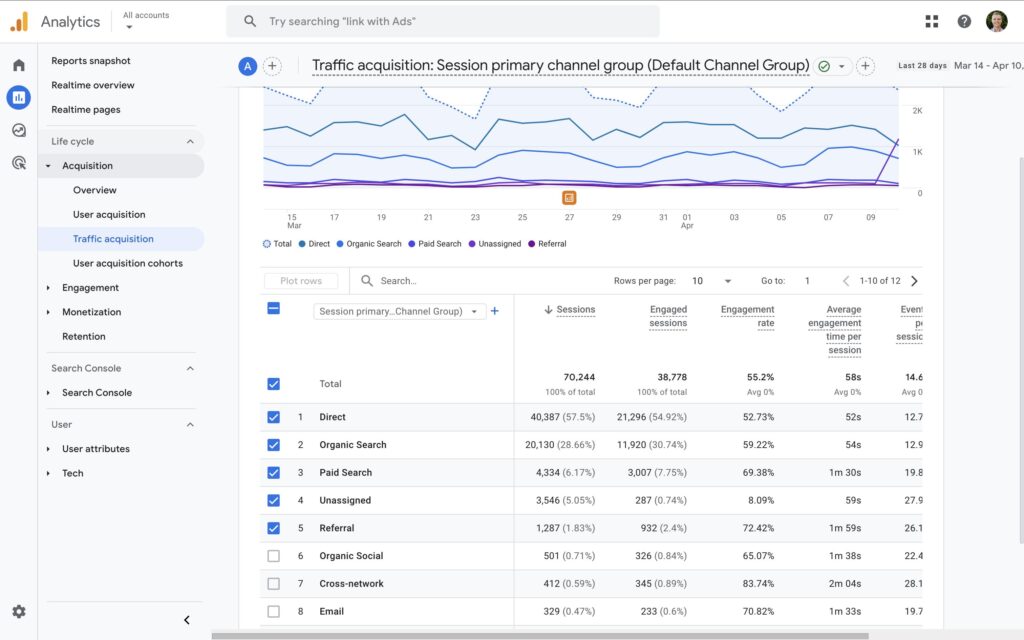
Setting Your Baseline with Google Analytics
Open Google Analytics and navigate to: Reports > Acquisition > Traffic Acquisition. Look at your Organic Search channel and note the following:
- How much traffic your site receives from search engines each month
- Which pages drive the most organic clicks
- Whether traffic has been growing, declining, or staying flat over 6–12 months
Export or screenshot this data. You will compare it to your post-audit numbers to measure the real impact of your work.
Checking Google Search Console for Errors
FEATURED SNIPPET: To check your website’s SEO health for free, use Google Search Console to identify crawl errors and indexed pages, Google PageSpeed Insights to check Core Web Vitals, and Screaming Frog SEO Spider (free up to 500 URLs) for a full technical crawl.
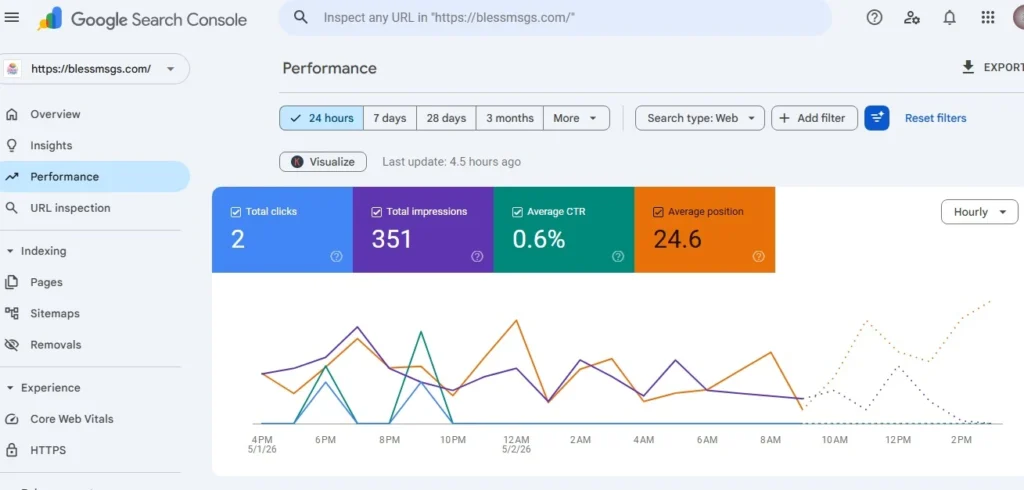
Google Search Console (GSC) is a free tool that shows you exactly how Google sees your site. It is the most important starting point for any SEO audit. Log in and check these four reports:
- Coverage Report shows which pages are indexed, excluded, or have errors
- Core Web Vitals Report flags pages failing Google’s page experience standards
- Manual Actions confirms whether Google has penalized your site
- Sitemaps verifies your XML sitemap is submitted and accepted
If you have not verified your site in Google Search Console yet, do it first. It takes less than 10 minutes and gives you data you simply cannot get anywhere else.
Step 1: Run a Technical SEO Checklist
Technical SEO is the foundation of your site’s search performance. If search engines cannot properly crawl and index your pages, even brilliant content will not rank. This is where most websites have hidden problems.
Crawlability and Indexation
Search engines use bots (called crawlers or spiders) to discover and read your pages. If your pages are blocked or inaccessible, they will not appear in search results.
Check the following as part of your technical SEO checklist:
- Is your robots.txt file present at yourdomain.com/robots.txt?
- Does it accidentally block important pages or entire sections of your site?
- All key pages listed in your XML sitemap and submitted to Google Search Console?
- Do all four URL versions (http, https, www, non-www) redirect correctly to one canonical version
- Are there any noindex tags accidentally applied to pages you want ranked?
Website Crawl Errors and How to Fix Them
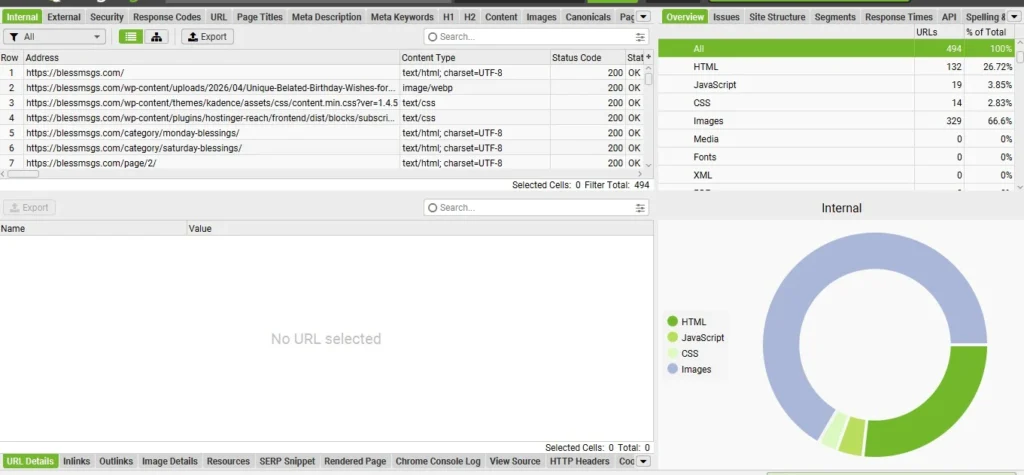
FEATURED SNIPPET: Website crawl errors occur when a search engine bot tries to visit a page but cannot reach it. The most common types are 404 errors (page not found), 500 server errors, redirect chains, and blocked resources. Find and fix them using Google Search Console or Screaming Frog
The most common crawl errors and their fixes:
- Redirect the deleted URL to the most relevant live page using a 301 redirect, or restore the original page if it was deleted by mistake.404 Errors (Page Not Found)
- Contact your hosting provider. These indicate server-side failures that prevent the page from loading.500 Server Errors
- Happens when URL A redirects to URL B, which redirects to URL C. Fix by pointing the original URL directly to the final destination.Redirect Chains
- CSS or JavaScript files blocked in robots.txt can prevent Google from rendering your pages correctly. Remove blocking rules for important assets. Blocked Resources
- To find all crawl errors, open Screaming Frog SEO Spider (free up to 500 URLs) or run a Site Audit inside Semrush. Both tools produce a full list of errors with affected URLs so you can fix them systematically.
HTTPS and Site Security
Google has confirmed that HTTPS is a ranking signal. If your site still runs on HTTP, it will not rank as well as secure competitors, and modern browsers will display a ‘Not Secure’ warning that damages user trust.
Check your SSL certificate by typing your domain into any browser. If the padlock icon is not visible next to your URL, contact your hosting provider to install an SSL certificate. Most modern hosts offer this for free through Let’s Encrypt.
Contact your hosting provider. These indicate server-side failures that prevent the page from loading at all.500 Server Errors
Redirect the deletRed URL to the most relevant live page using a 301 redirect, or restore the original page if it was deleted by mistake.404 Errors (Page Not Found)
XML Sitemap and Robots.txt
Your XML sitemap tells search engines which pages exist on your site and should be prioritized for crawling. Your robots.txt file tells them which areas to avoid.
A single mistake in robots.txt, such as accidentally disallowing your entire site can cause catastrophic ranking drops overnight. Always verify both files after any site update.
QUICK CHECK: Type yourdomain.com/robots.txt and yourdomain.com/sitemap.xml into your browser. Both should load correctly. If either returns a 404 error, fix it immediately.
Step 2: Conduct an On-Page SEO Audit
Once your technical foundation is solid, focus on on-page optimization. This ensures that every individual page properly signals its topic to search engines and delivers real value to users.
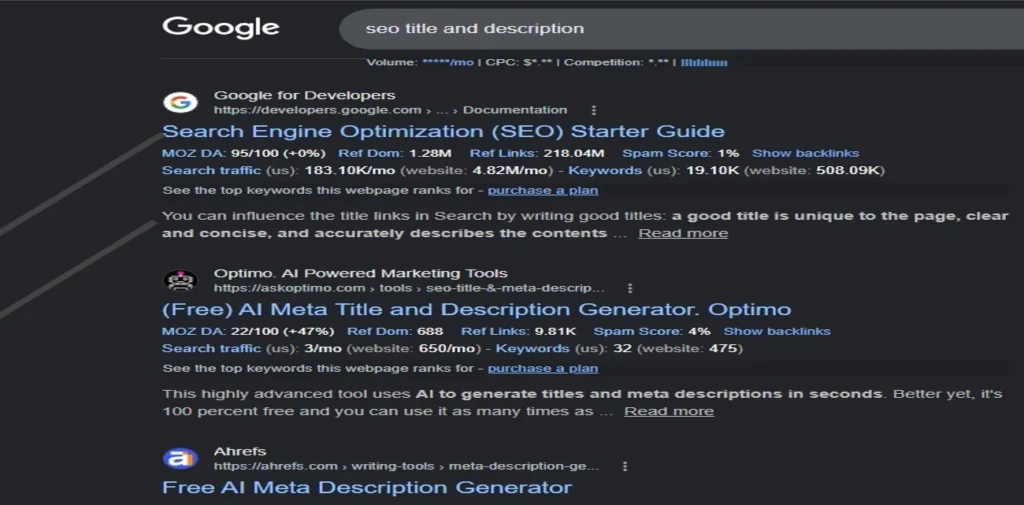
Title Tags and Meta Descriptions
Every page on your site should have a unique, descriptive title tag that includes your target keyword. Your title tag is the blue clickable headline users see in Google search results. It should be:
- Between 50 and 60 characters long
- Unique across every page on your site
- Written to accurately describe the page content while encouraging clicks
Your meta description should be between 140 and 160 characters. While it is not a direct ranking factor, a well-written meta description significantly improves your click-through rate from search results.
Common on-page SEO audit findings include:
- Missing title tags on internal pages
- Duplicate title tags across multiple pages (very common on e-commerce sites)
- Title tags that are too long and get truncated in search results
- Auto-generated or empty meta descriptions
Heading Structure (H1, H2, H3)
Each page should have exactly one H1 heading that clearly states the page’s primary topic and includes your main keyword. H2 headings divide the page into major sections. H3 headings break those sections into specific sub-points.
Use Screaming Frog or your browser’s Developer Console (right-click > Inspect) to check which heading tags are used on each page. Flag any pages with:
- Missing H1 tags
- Multiple H1 tags on a single page
- Heading tags are used purely for visual styling rather than content structure
- H3 headings used before any H2 headings (skipped hierarchy)
Content Quality and Keyword Coverage
For your most important pages, compare your content depth with that of the top three results currently ranking for your target keyword. Ask yourself:
- Does your page answer every question a user might have about this topic?
- Is your primary keyword naturally present in the first 100 words?
- Do you cover related subtopics and secondary keywords?
- Is the content fresh, accurate, and up to date for 2026?
Thin content pages with fewer than 300 words or pages that do not meaningfully address the search intent are one of the most common causes of poor rankings. Identify and expand these pages as part of your on-page SEO audit.
Image Optimization and Alt Text
Every image on your site should have descriptive alt text that helps search engines understand what the image shows. Alt text is also critical for accessibility, as screen readers use it to describe images to visually impaired users.
Also, check that image file sizes are compressed. Large, uncompressed images are among the top causes of slow page load times, which directly harm your Core Web Vitals scores and rankings.
Internal Linking Structure
Internal links connect your pages to each other and help search engines understand the relationship between your content. They also pass link equity (ranking power) from authoritative pages to pages that need a boost.
During your on-page SEO audit, look for:
- Orphan pages with no internal links pointing to them (search engines rarely find or rank these)
- Generic anchor text such as ‘click here’ or ‘read more’ replace with descriptive keyword-rich anchor text
- Key pages not linked from your homepage or main navigation
- High-traffic pages that could pass authority to important pages via new contextual links
Step 3: Audit Your Site Speed and Core Web Vitals
Page speed is a confirmed Google ranking factor. In 2026, it is measured primarily through Core Web Vitals a set of user experience metrics that Google uses to assess real-world page performance.
What Are Core Web Vitals in 2026?
FEATURED SNIPPET: Core Web Vitals are three Google measurements of real-world user experience: LCP (Largest Contentful Paint — target under 2.5s), INP (Interaction to Next Paint — target under 200ms), and CLS (Cumulative Layout Shift — target under 0.1). INP replaced FID in 2025 as the new responsiveness metric.
Here is what each metric measures and what score you need to pass:
- How long does it take for the main content of a page to load? Target: under 2.5 seconds.LCP (Largest Contentful Paint)
- How quickly your page responds to a user’s interaction, such as a button click. This replaced FID in 2024. Target: under 200 milliseconds.INP (Interaction to Next Paint)
- How much your page layout shifts unexpectedly while loading. Target: under 0.1.CLS (Cumulative Layout Shift)
How to Fix LCP, INP, and CLS Issues
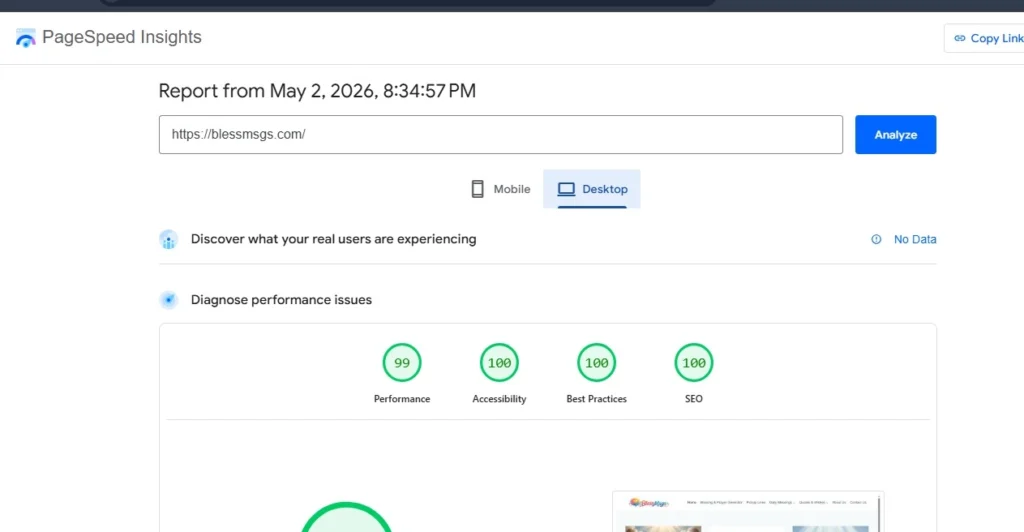
Run your URL through Google PageSpeed Insights (free at pagespeed.web.dev) to get a full diagnostic report. The tool flags exactly which elements are causing poor scores and provides specific recommendations for fixes.
Common fixes for each metric:
- Compress and convert images to WebP format. Enable lazy loading only on images below the fold. Use a fast hosting provider and CDN.LCP Fix
- Remove or defer unused JavaScript. Break up long tasks that block the main thread. Use event listeners efficiently.INP Fix
- Add explicit width and height attributes to all images and video embeds. Avoid inserting content above existing content after page load. CLS Fix
TIP: Fixing Core Web Vitals on your highest-traffic pages often produces the fastest ranking improvements, so start there before tackling lower-traffic pages.
Step 4: Check Your Backlink Profile
Backlinks links from other websites pointing to yours are one of Google’s most important ranking signals. Not all backlinks are created equal. Links from authoritative, relevant sites carry far more ranking power than links from spammy or irrelevant sources.
Finding Toxic Backlinks
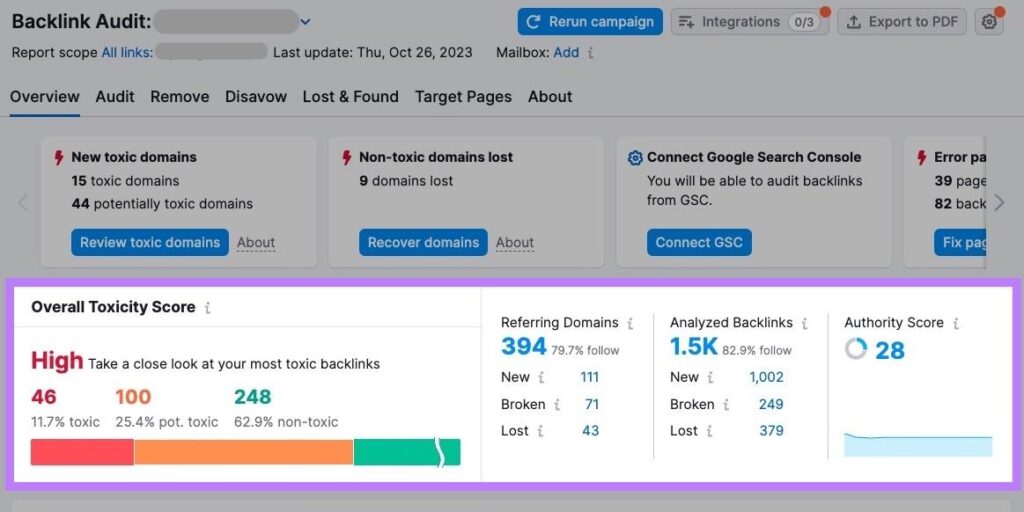
A toxic backlink is a link from a low-quality, spammy, or penalized website. Accumulating too many can harm your site’s authority and, in severe cases, trigger a manual action from Google.
Use Semrush’s Backlink Audit tool or Ahrefs to review your backlink profile. Look for:
- Links from sites with very low Authority Scores (under 10)
- Links from foreign-language sites with no relevance to your niche
- Links with over-optimized exact-match anchor text on every link pointing to you
- Links from known link farms, private blog networks (PBNs), or content spinning sites
If you find genuinely harmful backlinks, you can disavow them using Google’s Disavow Tool inside Search Console. This tells Google to ignore those links when assessing your site’s authority.
Identifying Link Building Opportunities
Your backlink audit is not just about removing bad links; it is also about discovering opportunities to earn better ones. Check which high-authority sites are linking to your top competitors but not to you. These represent clear, proven opportunities for targeted outreach and content promotion.
Step 5: Run a Content Audit
A content audit reviews every page on your site to identify which pages are earning traffic, which are stagnant, and which are actively harming your SEO performance. It is the step most website owners skip and often the one with the highest return.
Finding Thin and Duplicate Content
Thin content is any page that provides little or no real value to users. Duplicate content occurs when two or more pages on your site have substantially identical content. Both issues dilute your site’s authority and confuse search engines about which page to rank for a given query.
Use Semrush’s Site Audit or Screaming Frog to identify pages flagged for duplicate content, then:
- Add a canonical tag on the duplicate page pointing to the preferred original
- Merge two thin pages covering the same topic into one comprehensive resource
- Expand thin pages with more depth, examples, and updated information
- Delete or noindex pages with zero value that cannot be improved
Keyword Cannibalization: What It Is and How to Fix It
Keyword cannibalization happens when multiple pages on your site compete for the same keyword. Instead of one strong page ranking, you end up with two weaker pages splitting traffic and signals, and neither ranks as well as it should.
To identify cannibalization:
- Export your Google Search Console Search Results data
- Filter for keywords where two or more of your URLs are receiving impressions
- For each cannibalizing keyword pair, decide which page should be the primary ranking page
- Merge the weaker page into the stronger one (with a 301 redirect) OR differentiate the content so each targets a clearly different search intent
Optimizing for AI Search (AEO & GEO) The 2026 Gap
This is the content gap that almost no competitors’ guides address. In 2026, a growing share of search traffic is being answered directly by AI systems, such as Google’s AI Overviews, ChatGPT, Perplexity, and Claude. Your audit must now include an AI readiness check.
To optimize your content for AI search citation and inclusion:
- Write direct 2–3 sentence answers to specific questions at the start of relevant sections (this is the format AI systems extract answers from)
- Use structured data markup (FAQ schema, HowTo schema) to make your content machine-readable
- Build topical authority by creating comprehensive cluster content around your main pillar topics
- Clearly state your brand name, author credentials, and expertise signals throughout your content (E-E-A-T)
- Keep content factually accurate and regularly updated. AI systems strongly prefer reliable, current sources
- Ensure your site is accessible to LLM crawlers (check that your robots.txt does not block known AI crawl agents)
Best Free SEO Audit Tools in 2026
You do not need to spend a single dollar to run a thorough, professional-grade SEO audit. Here are the most powerful free tools available right now, along with exactly what each one is best for.
1. Google Search Console (Free)
The most important free tool in any SEO toolkit. Google Search Console shows you exactly how Google sees your site: which pages are indexed, what keywords you rank for, where you have crawl errors or manual penalties, and how your Core Web Vitals are performing. This should be your first stop and last check for every audit.
2. Screaming Frog SEO Spider (Free up to 500 URLs)
Screaming Frog is a desktop application that crawls your website exactly the way Google does. It surfaces broken links, duplicate content, missing meta tags, redirect chains, thin pages, and hundreds of other technical issues in minutes. The free version covers sites up to 500 pages, more than enough for most small and medium-sized businesses.
3. Semrush Site Audit (Free Tier)
Semrush’s Site Audit tool scans your website for over 140 technical and on-page SEO issues. The free plan allows audits of up to 100 URLs and generates a prioritized list of fixes with clear severity ratings (Errors, Warnings, Notices). It is one of the most beginner-friendly audit interfaces available and includes clear ‘Why and how to fix it’ explanations for every issue found.
4. SEOptimer (Free Report)
SEOptimer generates an instant, visual SEO health report for any URL. It checks on-page elements, technical factors, page speed, backlinks, and social signals and now includes GEO (Generative Engine Optimization) checks for AI search visibility. It is ideal for getting a quick, shareable overview of any page’s performance.
5. Google PageSpeed Insights (Free)
Google’s own free tool for measuring Core Web Vitals performance on both mobile and desktop. It provides a full diagnostic breakdown of exactly which elements are slowing your page down, along with specific fix recommendations from Google itself. Run every important page through PageSpeed Insights, not just your homepage.
Your SEO Audit Priority Fix Roadmap
Not all SEO issues are equally urgent. Use this three-tier priority framework to decide where to spend your time and resources first. Trying to fix everything at once leads to overwhelm and missed high-impact wins.
Tier 1 Critical Fixes (Resolve Within 48 Hours)
These issues can cause immediate, significant ranking drops and should be resolved as fast as possible:
- Pages accidentally blocked in robots.txt (prevents Google from crawling your content entirely)
- Missing or misconfigured canonical tags are causing widespread duplicate content across your site
- SSL certificate expired, or the site is running on HTTP instead of HTTPS
- Google manual action detected in Search Console
- Your XML sitemap is returning a 404 error or is not submitted to Google
- Your site is not resolving correctly (DNS errors, server down)
Tier 2 High-Priority Fixes (Resolve Within 2 Weeks)
These issues are seriously harming your performance, but do not require emergency action:
- 404 errors on important pages that are linked from other sites or internal pages
- Missing H1 tags or duplicate title tags across key landing pages
- Pages failing Core Web Vitals with LCP over 4 seconds on mobile
- Thin content pages under 300 words that are receiving organic impressions
- Orphan pages with no internal links, search engines rarely find or rank these
- Missing meta descriptions across high-traffic pages
Tier 3 Ongoing Optimizations (Monthly Maintenance)
These improvements compound over time and should be part of your regular SEO routine:
- Adding contextual internal links as you publish new content
- Refreshing and expanding top-performing pages with updated information
- Monitoring for new keyword cannibalization issues as your content library grows
- Checking backlink profile for newly acquired toxic links
- Reviewing Search Console for newly emerging crawl errors after site updates
- Running fresh Core Web Vitals tests after design or performance changes
How Often Should You Run an SEO Audit?
FEATURED SNIPPET: Run a full SEO audit every three to six months. After major Google algorithm updates or significant website changes, perform a targeted review immediately. Monthly mini-audits using Google Search Console help catch new issues early before they affect rankings.
Here is a simple audit frequency framework based on your site’s activity level:
- Full audit every 6 months. Monthly Search Console check. Small sites/blogs (under 100 pages)
- Full audit every 3 months. Bi-weekly Search Console check. Medium sites (100–500 pages)
- Full audit every 1–2 months. Weekly automated monitoring using Semrush or Ahrefs alerts.Large sites/e-commerce (500+ pages)
- Run a targeted traffic review within 72 hours to catch any ranking changes early. After any major Google algorithm update
- Run a full audit immediately and again 30 days later to verify all redirects and indexation are correct. After a site redesign or CMS migration
Frequently Asked Questions
What is an SEO audit of a website?
An SEO audit is a structured review of your website that identifies technical errors, on-page optimization gaps, content quality issues, and backlink problems preventing you from ranking higher in search engines. It produces a prioritized list of fixes you can act on to improve organic traffic.
How do I check my website’s SEO health for free?
The best free way to check your website’s SEO health is to use Google Search Console for indexation and crawl error data, Google PageSpeed Insights for Core Web Vitals performance, and Screaming Frog SEO Spider (free up to 500 URLs) for a full technical crawl. Together, these three tools cover the most critical areas of any SEO audit at zero cost.
What does a technical SEO checklist include?
FEATURED SNIPPET: A technical SEO checklist includes crawlability and indexation checks, robots.txt and XML sitemap configuration, HTTPS and site security, page speed and Core Web Vitals, mobile-friendliness, structured data, duplicate content issues, redirect chains, and internal linking health.
How long does an SEO audit take?
A basic SEO audit using free tools takes two to four hours for a small website. A comprehensive audit of a larger site, covering technical, on-page, content, and backlink analysis, typically takes one to three full days. Using an automated tool like Semrush’s Site Audit significantly reduces the time required and makes the process repeatable.
What are the most common website crawl errors?
The most common crawl errors are 404 errors (pages that no longer exist), 500 server errors (server failures), redirect chains (multiple consecutive redirects slowing crawlers), and blocked resources (CSS or JavaScript files prevented from being crawled by robots.txt). All of these can be found and fixed using Google Search Console and Screaming Frog.
What is the difference between an on-page and a technical SEO audit?
A technical SEO audit focuses on infrastructure-level issues: how search engines crawl, index, and render your site. An on-page SEO audit focuses on individual page elements: title tags, meta descriptions, headings, content quality, keyword usage, and internal linking. Both are essential parts of a complete website SEO audit and should be run together.
How often should I audit my website for SEO?
Run a full SEO audit every three to six months. After major Google algorithm updates or significant site changes (migrations, redesigns, large content deletions), run a targeted review immediately. Monthly mini-audits using Google Search Console help you catch new issues early, before they significantly affect your rankings.
Can I do an SEO audit myself, or do I need to hire an expert?
You can absolutely run your own SEO audit using free tools like Google Search Console, Screaming Frog, and PageSpeed Insights. This guide gives you everything you need to get started. For larger sites or highly competitive industries, hiring an SEO specialist can help you interpret complex data and develop a more advanced strategy, but the core audit process is entirely learnable.
Final Thoughts
An SEO audit of your website is not a one-time task; it is an ongoing practice that keeps your site competitive, healthy, and aligned with how search engines (and AI systems) discover and rank content.
Start with the free tools. Follow the steps in this guide in order. Fix the critical issues first, then systematically work through the high-priority and ongoing improvements. The results compound over time.
Every website has hidden SEO problems. Now you have the tools and the checklist to find yours.
Bookmark this guide and run your first audit this week. Set a calendar reminder for your next audit in 90 days. SEO is not a sprint; it is a process. And every audit gets you closer to the rankings your content deserves.
PROFESSIONAL SEO SERVICES
Ready to Rank Higher on Google? Let Us Do the Heavy Lifting.
You now know exactly what an SEO audit involves. But doing it right consistently, at scale, and with expert execution takes time, tools, and experience. That is where our SEO services come in.
1. SEO Audit Service Full Website Analysis
Not sure where to start? Our expert team runs a complete, hands-on SEO audit of your website and delivers a prioritized action plan no guesswork, no jargon. You get a clear roadmap of exactly what to fix and in what order.
What our SEO Audit Service includes:
- Full technical SEO crawl using Screaming Frog + Semrush Site Audit
- On-page SEO analysis of your top 20 most important pages
- Core Web Vitals report with device-specific fix recommendations
- Backlink profile review toxic link identification and disavow file
- Content audit thin pages, duplicate content, and cannibalization report
- Keyword gap analysis against your top 3 competitors
- AI Search Optimization (AEO/GEO) readiness assessment
- Priority fix roadmap delivered as a structured action plan (PDF + Google Sheet)
IDEAL FOR: Business owners, bloggers, and e-commerce sites who want a professional diagnosis of why their site is not ranking and a clear plan to fix it.
2. Technical SEO Service Fix the Foundation
Technical errors are the silent killers of search rankings. Our technical SEO service does not just identify problems we fix them for you, working directly with your development team or implementing changes ourselves.
Our Technical SEO Service covers:
- robots.txt and XML sitemap configuration and submission
- Canonical tag implementation across all pages
- 301 redirect mapping and redirect chain cleanup
- HTTPS migration and SSL verification
- Structured data (Schema markup) implementation FAQ, HowTo, Article, BreadcrumbList
- Page speed optimization image compression, lazy loading, JavaScript deferral
- Core Web Vitals improvement LCP, INP, and CLS fixes
- Mobile-first indexing compliance review
- Log file analysis to understand how Google is crawling your site
IDEAL FOR: Sites that have had a redesign, CMS migration, or are experiencing sudden ranking drops after a Google algorithm update.
3. On-Page SEO Service: Optimize Every Page
On-page SEO is where rankings are won or lost at the page level. Our team optimizes your most important pages to align perfectly with search intent, keyword targeting, and Google’s quality guidelines, so every page works harder for you.
Our On-Page SEO Service includes:
- Title tag and meta description rewriting for all target pages
- Heading structure (H1, H2, H3) optimization with primary and secondary keywords
- Content gap analysis expanding thin pages to match competitor depth
- Internal linking strategy, adding contextual links across your content library
- Image optimization compression, alt text writing, and WebP conversion
- Featured snippet optimization rewriting key sections to win Position Zero
- Keyword cannibalization identification and page consolidation
- E-E-A-T signal strengthening author bios, trust signals, citation additions
IDEAL FOR: Websites with existing content that is ranking on pages 2–4 and needs a targeted push to break into the top 3 results.
4. Monthly SEO Management Ongoing Growth
SEO is not a one-time project. Rankings require consistent effort, content creation, and adaptation to algorithm changes. Our Monthly SEO Management service puts your organic growth on autopilot with a dedicated expert managing your entire SEO strategy every month.
Monthly SEO Management includes everything in our other services, plus:
- Monthly SEO audit and health check report
- 2–4 new SEO-optimized blog posts or landing pages per month (based on your package)
- Keyword research and content calendar planning
- Link building outreach earning high-authority backlinks to your site
- Google Search Console monitoring and alert response
- Competitor ranking tracker we monitor your top 10 competitors every week
- Monthly performance report with traffic, rankings, and conversion data
- Algorithm update response immediate analysis and strategy adjustment after major Google updates
IDEAL FOR: Businesses serious about long-term organic growth who want a done-for-you SEO solution without hiring an in-house team.
5. Local SEO Service — Dominate Your City
If your business serves a specific city, region, or area, Local SEO is the fastest path to getting found by customers who are ready to buy. We optimize your entire local presence from your Google Business Profile to location-specific landing pages.
Our Local SEO Service covers:
- Google Business Profile (GBP) full optimization categories, photos, posts, Q&A
- Local keyword research finding the exact searches your nearby customers use
- Location landing page creation and on-page optimization
- NAP consistency audit Name, Address, Phone number across all directories
- Citation building listing your business in 50+ relevant local directories
- Local link building earning backlinks from local news sites, blogs, and directories
- Review generation strategy ethical approach to building 5-star reviews
- Google Maps ranking optimization
IDEAL FOR: Local businesses, restaurants, clinics, law firms, real estate agencies, and service-area businesses that want to rank in the Google Maps pack and local search results.
6. E-Commerce SEO Service More Traffic, More Sales
E-commerce SEO has its own unique challenges thousands of product pages, duplicate content risks, faceted navigation issues, and intense competition. Our e-commerce SEO specialists know exactly how to turn your online store into a traffic and revenue machine.
Our E-Commerce SEO Service includes:
- Product page optimization titles, descriptions, schema, and image alt text
- Category page SEO turning your most important category pages into ranking powerhouses
- Duplicate content resolution canonical tags and parameter handling for faceted navigation
- Structured data Product schema, Review schema, and BreadcrumbList implementation
- Site architecture review ensuring every product is crawlable and internally linked
- Shopping feed optimization improving visibility in Google Shopping results
- Seasonal content strategy blog content that drives traffic to your product pages
IDEAL FOR: Shopify, WooCommerce, Magento, and custom e-commerce stores that want to reduce their dependency on paid ads and build sustainable organic revenue.
Our SEO Service Packages
We offer flexible packages designed to fit businesses of all sizes from startups to established enterprises. Every package includes a dedicated SEO consultant, monthly reporting, and a transparent results-focused approach.
Package | Starter | Growth | Authority |
Best For | Small sites, blogs, and local businesses | Growing businesses, e-commerce | Enterprises, competitive niches |
SEO Audit | ✓ | ✓ | ✓ |
Technical SEO Fixes | Basic | ✓ | ✓ Advanced |
On-Page Optimization | 5 Pages | 15 Pages | Unlimited |
Monthly Blog Posts | 2 Posts | 4 Posts | 8 Posts |
Link Building | — | 5 Links/mo | 15 Links/mo |
Monthly Reporting | ✓ | ✓ | ✓ Advanced |
Why Choose Our SEO Services?
There are hundreds of SEO agencies out there. Here is what makes our approach different and why our clients see real, measurable results.
Transparent and Results-Focused
We do not hide behind vanity metrics. Every report we deliver shows you the numbers that actually matter: organic traffic growth, keyword ranking improvements, and leads or revenue driven by SEO. No fluff, no filler.
White-Hat SEO Only
We follow Google’s guidelines exclusively. No black-hat tricks, no PBN links, no keyword stuffing. Our strategies are built for long-term, sustainable rankings not quick wins that collapse after the next algorithm update.
AI-Ready SEO Strategy
Most agencies are still optimizing for traditional Google rankings. We also optimize for AI search ensuring your content gets cited in Google AI Overviews, ChatGPT responses, Perplexity, and other AI-powered discovery platforms. This is the future of search, and we are already ahead of it.
Dedicated Expert, Not a Call Center
When you work with us, you get a dedicated SEO consultant who knows your business, your competitors, and your goals. No rotating account managers, no templated reports, no generic strategies.
Proven Process
The exact audit methodology described in this guide is the same process our team uses for every client. You have already seen how thorough and systematic it is. Imagine that level of expertise applied to your website every single month.
What Our Clients Say
“After just 3 months of working with this team, our organic traffic increased by 143%. They found technical issues we had no idea existed and fixed them fast. The monthly reports are clear, honest, and actually useful.”
E-Commerce Store Owner, Fashion Niche
“We were stuck on page 2 for over a year. Within 60 days of the SEO audit and on-page optimization, our main keyword jumped to position 3. I wish we had hired them sooner.”
SaaS Founder, B2B Software
“Our local business went from invisible to the top of the Google Maps pack in our city. Calls and walk-ins increased within the first month. Absolutely worth every penny.”
Owner, Local Dental Clinic
Ready to Grow Your Organic Traffic?
Get a free 30-minute SEO consultation. We will review your site, identify your biggest opportunities, and tell you exactly what it will take to rank on page one.
GET YOUR FREE SEO CONSULTATION TODAY
Contact us: [freelancingservices159@gmail.com]
[raxivodigital.co.uk] | [your phone number]
No contracts. No hidden fees. Just real SEO results.
Last updated: 2026 | Reviewed quarterly for accuracy
Topics: SEO Audit | Technical SEO Checklist | On-Page SEO Audit | Website Health Check | Free SEO Audit Tools | Website Crawl Errors | SEO Services